2016 Chevrolet Equinox Key Fob Programming
Updated 2026 Programming, battery & replacement fob
You can program a 2016 Chevrolet Equinox key fob yourself in a few minutes using a working key or remote, no dealer visit needed. Follow the steps below, then check the battery and the correct replacement fob (with FCC ID and part number) if you need a new one.
Remote / key fob programming
This GM vehicle comes in two ignition types — match yours. On a regular ignition you add a key with one working key; on push-button start you program smart keys (Method A with two, Method B with one or none).
Before you start
- Your new key/smart key, cut beforehand
- Engine off for the push-button methods
Regular key ignition (adds a key)
- 1Insert the original, already-programmed key and start the engine.
- 2Turn the key off and remove it.
- 3Within 10 seconds, insert the new key and turn to ON (don't start).
- 4The security light goes out once the key is programmed. No security light? Wait 10 minutes and 45 seconds.
- 5Repeat from step 1 for additional keys.
Push-button start — Method A (two working smart keys)
- 1Remove the emergency key blade from one of the working smart keys.
- 2Place both working smart keys in the cupholder.
- 3Insert the emergency key blade into the driver's-door lock cylinder and turn counterclockwise to unlock five times within 10 seconds. The display shows READY FOR REMOTE #2.
- 4Place the new smart key in the transmitter pocket — center console for Cadillac, front cupholder for Chevrolet and Buick.
- 5Press ENGINE START/STOP. When recognized, the display is ready for the next key.
- 6Take the key out and press Lock or Unlock. To add more, repeat the last three steps, then press and hold ENGINE START/STOP about 12 seconds to exit.
Push-button start — Method B (one or no smart key)
About 30 minutes; not available in Canada. With no working key, have the new blade cut by a locksmith first.
- 1Remove the key blade from your existing or new smart key and insert it into the driver's-door lock cylinder. Turn counterclockwise to unlock five times within 10 seconds. The display shows READY FOR REMOTE #2.
- 2Wait 10 minutes until it shows PRESS ENGINE START BUTTON TO LEARN, then press ENGINE START/STOP (it shows REMOTE LEARN PENDING).
- 3Repeat that sequence two more times. After the third, all previous keys stop working and the display shows READY FOR REMOTE #1.
- 4Place the new smart key in the transmitter pocket, press ENGINE START/STOP, then take it out and press Lock or Unlock.
- 5To add another key, repeat the last step's actions, then press and hold ENGINE START/STOP about 12 seconds to exit.
Key programming
On this GM vehicle you can add a key yourself (these steps program both the key and remote together). On a regular ignition you use one working key; on push-button start you program transmitters. Works only for non-PEPS keys, not vehicles with passive entry, and not in Canada.
Before you start
- Your new key, cut beforehand
Regular key ignition (adds a key, keeps existing keys)
- 1Insert the original, already-programmed key and start the engine.
- 2Turn the key off and remove it.
- 3Within 10 seconds, insert the new key and turn to ON.
- 4The security light goes out once the key is programmed. No security light (some 2004–2007 Grand Prix, Bonneville, Impala)? Wait 10 minutes and 45 seconds.
- 5Repeat from step 1 for additional keys.
Push-button start — with at least one working transmitter
- 1Place the recognized (working) transmitter in the cupholder.
- 2Insert the new key into the driver's-door lock cylinder and turn to unlock five times within 10 seconds. The display shows Ready For Remote #2–5.
- 3Pull out the cupholder and place the new transmitter in the transmitter pocket beneath it.
- 4Press the ignition. When learned, the display is ready for the next transmitter.
- 5Remove the transmitter and press Unlock. To add more, repeat the last three steps, then press and hold the ignition 5 seconds to exit.
Push-button start — with no working transmitter
About 30 minutes; up to 5 transmitters. Connect jumper cables or a charger — battery voltage drops.
- 1Insert the new key into the driver's-door lock cylinder and turn to unlock five times within 10 seconds. The display shows Remote Learn Pending.
- 2Wait 10 minutes until it shows Press Engine Start Button To Learn, then press the ignition (it shows Remote Learn Pending again).
- 3Repeat the previous step two more times. After the third, all previous transmitters stop working and the display shows Ready For Remote #1.
- 4Pull out the cupholder and place the new transmitter in the transmitter pocket beneath it.
- 5Press the ignition. When learned, the display is ready for the next transmitter.
- 6Remove the transmitter and press Unlock. To add more, repeat the last three steps, then press and hold the ignition 5 seconds to exit.
Replacement key fobs
Find your key type below, then match the FCC ID printed on the back of your existing fob — or, for a plain transponder key, the blank code — to be sure of the right part.
Remote Head Key
2 versionsOne piece: a cut metal blade with the lock/unlock buttons built into the head.
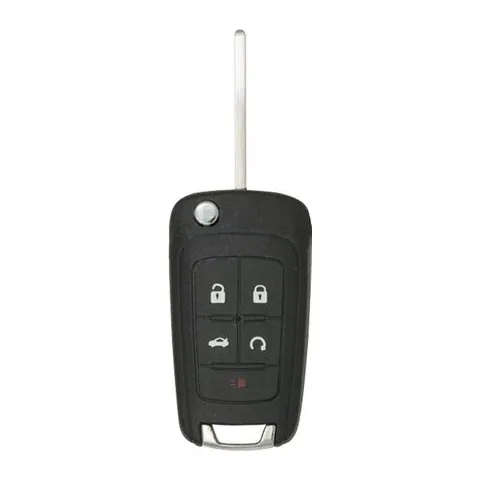
4/5-button Remote Head Key
Find on Amazon- FCC ID
- OHT05918179, P4O9MK74946931
- OE part #
- 13500224, 13500225, 13500318, 13500319, 13504202, 13504236 +19 more
- Frequency
- 315 MHz
- Chip
- PHILIPS ID 46
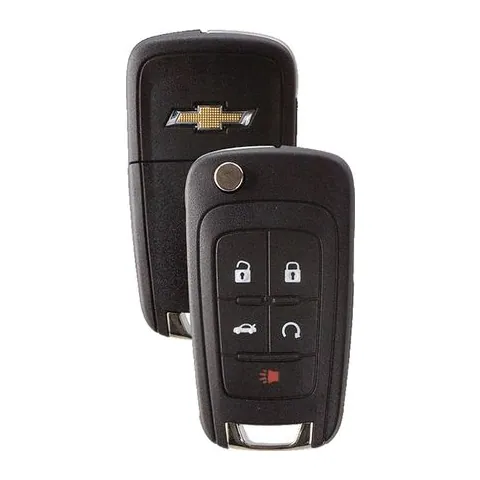
3/4/5-button Remote Head Key
Find on Amazon- FCC ID
- AVL-B01T1AC, AVL-B01T2AC, KR55WK50073, OHT01060512, V2T01060512, V2T01060514
- OE part #
- 13500221, 13500222, 13500226, 13500227, 13501513, 13501514 +60 more
- Frequency
- 315 MHz
- Chip
- PHILIPS ID 46 GM EXT
Photos show the OEM part for each number listed. Aftermarket replacements sold online are often slightly different in appearance — the FCC ID, not the shape, is what determines whether a fob will work with your car.
2016 Chevrolet Equinox key fob battery
Your 2016 Chevrolet Equinox key fob uses a CR2032 3V lithium coin cell. A fresh one typically lasts 3–5 years.
Find CR2032 batteries on AmazonHow to replace the battery
- 1 Look for a small notch or screw on the side of the fob where the key blade meets the buttons.
- 2 Pry the housing apart with a coin or small flathead (or remove the screw).
- 3 Pop out the old coin cell, noting its orientation.
- 4 Insert the new battery the same way up, then snap the case shut.
- 5 Test the buttons — if they work, you're done.
Battery tips
- Use a fresh, name-brand 3V lithium cell — bargain cells drain quickly.
- Try not to touch both faces of the new battery; skin oils shorten its life.
- If the buttons still don't respond after a new battery, the remote may need re-syncing or programming.
We may earn a commission on qualifying purchases made through links on this page, at no extra cost to you. It never affects which product we recommend. Learn more.
Rather hire a pro?
See what it actually costs, broken out by dealer, locksmith, and DIY: