Buying guide Updated 2026
The Best Fingerprint Door Locks of 2026
A fingerprint lock is the fastest everyday entry method on a smart deadbolt — no fumbling for a phone, no typing a code in the rain. But the readers vary a lot in accuracy, most add real cost, and a few locks go fully keyless (no physical key at all), which is a dealbreaker for some households. These six picks cover the range from $80 to $330, verified against live sources in June 2026.
At a glance — 6 fingerprint door locks compared (prices verified June 2026)
| Lock | Best for | Approx. price | Key & install |
|---|---|---|---|
| Ultraloq Bolt Fingerprint Check price | Best overall | $175–$200 | New deadbolt · keyless + backup key |
| Wyze Auto-Lock Bolt v2 Check price | Best value | ~$80 | New deadbolt · fully keyless |
| Kwikset Halo Touch Check price | Best mainstream brand | $200–$250 | New deadbolt · keyed (SmartKey), no keypad |
| Aqara Smart Lock U100 Check price | Best for Apple homes | $130–$190 | New deadbolt · keyed (2 keys) |
| Lockly Secure Pro Check price | Best premium | $249–$330 | New deadbolt · keyed (2 keys) |
| Yale Assure Lock 2 (fingerprint) Check price | Best legacy brand | $160–$260 | New deadbolt · keyless |
How to choose a fingerprint door lock
Every lock here replaces your existing deadbolt — all fit a standard door bore with no drilling. The fingerprint reader is the thing that sets them apart from ordinary smart deadbolts, and it comes with trade-offs worth understanding before you buy.
- Accuracy and failed-read fallback: fingerprint readers on this list range from good to excellent, but wet fingers, deep cuts, and extreme cold all hurt read rates. Check what happens on a failed read. Most of these fall back to a PIN keypad plus an app unlock or physical key — but the Kwikset Halo Touch has no number keypad at all, so its only backups are the physical key or the app. Separately, the two fully keyless picks (the Wyze and the Yale fingerprint model) have no physical key, so if their reader fails you are relying on the keypad or app — not ideal if you have young children or elderly family members who struggle with PINs.
- Physical key vs fully keyless: three picks here are fully keyless (no key cylinder). That means one fewer thing to lose, but also no mechanical fallback if the battery dies and you can't reach a USB-C emergency port. The Aqara U100, Lockly Secure Pro, and Ultraloq Bolt Fingerprint all include physical backup keys.
- Number of fingerprints: the Wyze stores up to 8 fingerprints, which is fine for a small household. The Aqara U100 stores 50, the Lockly Secure Pro stores 99. For families, vacation rentals, or frequent houseguests, more stored prints reduces re-enrollment hassle.
- Wet and cold finger performance: no capacitive fingerprint reader is immune here. Optical readers (used by most of these locks) struggle more with very wet fingers than 3D biometric sensors (the Lockly Secure Pro uses a 3D sensor). In practice: dry your finger on your pants before scanning in the rain — this is the real-world workaround for all of them.
- Cost premium: a fingerprint reader adds $20–$60 over an equivalent keypad-only model. For the Wyze at $80, that premium is already priced in. On the higher-end picks, you are also paying for connectivity (built-in Wi-Fi) and build quality, not just the fingerprint feature.
Going fully keyless?
The Wyze Auto-Lock Bolt v2 and Yale Assure Lock 2 fingerprint model have no key cylinder at all. That is a legitimate choice if your household is tech-comfortable and you want to eliminate key copying. But have a plan for the battery dying — both keep a PIN keypad as a fallback, and both have an external emergency-power contact to revive a dead lock long enough to enter your code: a USB-C port on the bottom of the Wyze, and 9V battery terminals on the Yale. If anyone in your home is not comfortable with a PIN code, keep a keyed model.
The 5 picks in detail
All six locks below replace the whole deadbolt — none of them are interior-only conversions. If you need to keep your existing exterior lock and key (renters, for example), look at the Yale Approach instead; it has no fingerprint reader but preserves your original key.
No Schlage on the list?
A fair question, since Schlage and Kwikset are the two names you see on most American front doors. Kwikset makes a strong fingerprint lock — the Halo Touch, included above. Schlage does not: as of 2026, Schlage confirms it offers no residential biometric or fingerprint lock. Its smart deadbolts (the Encode and the newer Arrive) are keypad and app only. If you want a Schlage specifically, you are choosing a code, not a fingerprint.
The picks
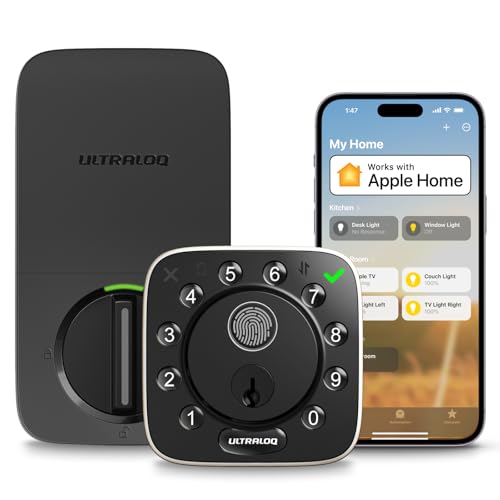
1. Ultraloq Bolt Fingerprint
The Ultraloq Bolt Fingerprint hits the fingerprint-lock sweet spot: a fast, reliable reader on a full keypad deadbolt that still ships with a physical backup key, so you are not locked out if the reader fails. It comes in a built-in Wi-Fi and Apple Home edition and a Matter-over-Thread edition — a wider ecosystem than most competitors at this price. The one catch is a confusing lineup of similar-looking SKUs; double-check you're buying the edition with features you actually want before ordering.
Pros
- Fast fingerprint + keypad + physical backup key — three fallbacks
- Wi-Fi and Apple Home or Matter editions at the same price tier
- Slim design, easy DIY install
Cons
- Several similar SKUs — easy to order the wrong edition
- Some editions need a separate bridge for remote Wi-Fi access

2. Wyze Auto-Lock Bolt v2
At around $80 with built-in Wi-Fi and a fingerprint reader, the Wyze Auto-Lock Bolt v2 is the most affordable fingerprint smart deadbolt you can buy at a major retailer. PCWorld gave it an Editors' Choice for value. The trade-off is that it is fully keyless — fingerprint and keypad only, no physical key cylinder — and it stores only 8 fingerprints. For a single person or a couple comfortable with tech, this is hard to beat. For families with kids or older adults, consider stepping up.
Pros
- Built-in Wi-Fi at a price no competitor matches
- Fingerprint + keypad entry, auto-lock
- Replaces standard deadbolt, no drilling
Cons
- Fully keyless — no physical key backup
- Only 8 stored fingerprints (limiting for larger households)
- No Apple Home Key or Matter
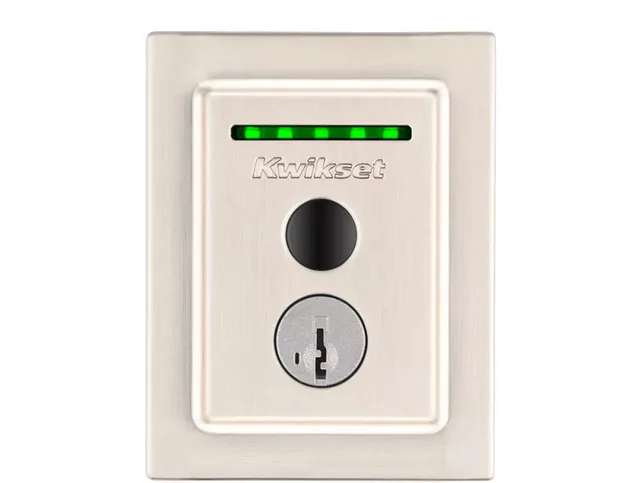
Image: Kwikset
3. Kwikset Halo Touch
If you want a fingerprint lock from a name you already trust at the hardware store, the Kwikset Halo Touch is the pick. It pairs a fingerprint reader with built-in Wi-Fi (no hub), a real physical backup key, and Kwikset's SmartKey technology that lets you re-key the lock yourself in seconds. It carries the highest residential security grade (ANSI/BHMA AAA) and stores up to 100 fingerprints for 50 users. The one quirk to know: there is no number keypad — entry is fingerprint, app, or key only — so everyone who uses the door needs an enrolled fingerprint or the app, with the physical key as the universal backup.
Pros
- Trusted big-box brand with nationwide availability and support
- Physical key + SmartKey re-key technology; built-in Wi-Fi, no hub
- Grade AAA security; stores 100 fingerprints for 50 users
Cons
- No PIN keypad — no code entry for guests without the app
- No Apple Home Key or Matter
- Pricier than the Wyze or Aqara

4. Aqara Smart Lock U100
The Aqara U100 is the fingerprint lock purpose-built for Apple households. It supports Apple Home Key — the standard that lets you tap your iPhone or Apple Watch on the lock to open it — alongside a fingerprint reader, touchscreen keypad, and two physical backup keys. It stores up to 50 fingerprints and carries an IP65 weatherproof rating and a BHMA Level 3 equivalent safety certification. The catch: it requires an Aqara hub for remote access and for sharing Apple Home Key with family members. The hub is sold separately (around $25–$35) or in a kit bundle. If you are already in the Aqara or Apple HomeKit ecosystem, this is the cleanest fingerprint deadbolt available at the price. MacRumors reviewed it positively for Apple home integration.
Pros
- Apple Home Key via NFC (tap iPhone or Apple Watch to unlock)
- 50 stored fingerprints; includes 2 physical backup keys
- IP65 weatherproof, BHMA Level 3 equivalent — strong hardware
Cons
- Requires Aqara hub for remote access and full Home Key sharing (sold separately)
- No built-in Wi-Fi — hub-dependent for everything beyond Bluetooth range
- Fingerprint reader rated at 98.6% accuracy — good, but not 100%
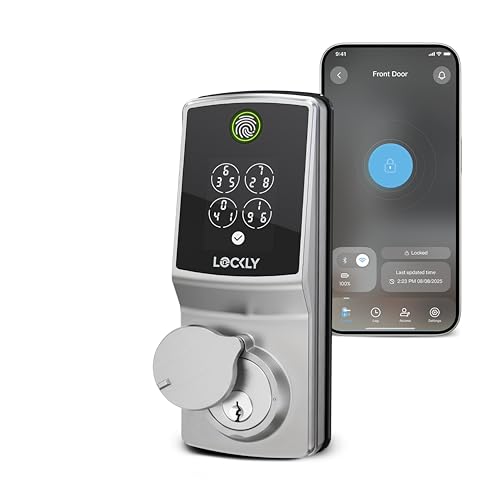
5. Lockly Secure Pro
The Lockly Secure Pro packs the most unlock methods of any lock on this list: a 3D biometric fingerprint sensor (0.2 seconds, stores up to 99 prints), the patented PIN Genie keypad that scrambles digit positions every time someone approaches so smudge attacks cannot reveal your code, app control via built-in Wi-Fi (no hub needed), voice control via Alexa and Google Assistant, QR scan access, and two physical backup keys. TechHive reviewed it favorably for its biometric accuracy and Wi-Fi convenience. It is the most expensive pick here, and it does not support Apple Home Key or Matter — so if your home runs on Apple, the Aqara U100 is a better fit. But for sheer unlock-method breadth and security-minded keypad design, nothing else here matches it.
Pros
- 3D fingerprint sensor stores 99 prints — best capacity on this list
- PIN Genie shuffles keypad digits to defeat smudge-pattern attacks
- Built-in Wi-Fi, no hub or bridge needed
- IP65 rated, 5-year mechanical warranty
Cons
- Most expensive pick ($249–$330)
- No Apple Home Key or Matter support
- Bulkier interior compared to minimalist competitors

6. Yale Assure Lock 2
Yale has been making locks for over 175 years, and the Assure Lock 2 fingerprint model (YRD450-F) is the keyless flagship of their consumer smart-lock line. It is fully keyless — fingerprint or touchscreen keypad entry only, no physical key cylinder — and available in a Wi-Fi or Bluetooth-only configuration. If brand trust and retailer availability matter (it is stocked at Home Depot, Lowe's, Amazon, and more), this is the fingerprint lock from the name homeowners already know. Just be aware the fingerprint version is specifically the YRD450-F model; other Assure Lock 2 variants do not have a fingerprint reader.
Pros
- Trusted legacy brand, stocked nationwide
- Clean, slim touchscreen design
- Wi-Fi models available for remote access with no hub
Cons
- Fully keyless — fingerprint + keypad only, no physical key backup
- Must confirm you are buying the YRD450-F fingerprint model, not another variant
- More expensive per feature than the Wyze or Aqara at this task
Our pick: Ultraloq Bolt Fingerprint
For most people, the Ultraloq Bolt Fingerprint is the best fingerprint deadbolt — it combines a fast reader with a physical backup key, Wi-Fi connectivity, and broad ecosystem support at a price that is not punishing. Budget-minded buyers who are comfortable going keyless should look at the Wyze Auto-Lock Bolt v2 at around $80. Apple households will get the cleanest experience from the Aqara Smart Lock U100, which brings Apple Home Key tap-to-unlock alongside the fingerprint reader — just budget for the hub. Power users who want the most unlock methods and the highest fingerprint storage should look at the Lockly Secure Pro. And if you want a fingerprint lock from a mainstream brand you already trust — with a real backup key and a top security grade — the Kwikset Halo Touch is the safe choice (just remember it has no number keypad). Yale's Assure Lock 2 fingerprint model rounds things out as the keyless option from a heritage lock name.
We may earn a commission on qualifying purchases made through links on this page, at no extra cost to you. It never affects which product we recommend. Learn more.
Product prices and availability are accurate as of the date/time indicated and are subject to change. Any price and availability information displayed on Amazon.com at the time of purchase will apply to the purchase of this product. Certain content that appears on this site comes from Amazon. This content is provided ‘as is’ and is subject to change or removal at any time.
Frequently asked questions
- What happens if the fingerprint reader fails to read my finger?
- Most locks here have a PIN keypad fallback — you can always enter your code if the reader does not recognize your finger. The exception is the Kwikset Halo Touch, which has no number keypad; its backups are the physical key or the app. For a physical key backup, the Kwikset Halo Touch, Aqara U100, Lockly Secure Pro, and Ultraloq Bolt Fingerprint all include one. The Wyze Auto-Lock Bolt v2 and Yale Assure Lock 2 fingerprint model are fully keyless (keypad + fingerprint only, no key cylinder); if the battery is dead, you revive the lock with its external emergency power — a USB-C port on the Wyze, or 9V battery terminals on the Yale — then enter your code on the keypad.
- Are fingerprint door locks safe and secure?
- Consumer fingerprint locks are generally safe for residential use — they pass the same ANSI/BHMA mechanical security standards as keyed deadbolts, and spoofing a modern optical or 3D biometric reader is much harder than copying a key. The Aqara U100 meets a BHMA Level 3 equivalent standard and carries an IP65 weatherproof rating; the Lockly Secure Pro is also IP65 rated. The security of a fingerprint lock depends mostly on the underlying deadbolt hardware and your door frame, not the biometric reader — a strong strike plate and reinforced frame matter more than the unlock method.
- How many fingerprints can I store on a fingerprint door lock?
- It varies significantly by model. The Wyze Auto-Lock Bolt v2 stores 8 fingerprints — enough for one or two people. The Aqara Smart Lock U100 stores 50. The Lockly Secure Pro stores 99, and the Kwikset Halo Touch stores 100 for up to 50 users. The Ultraloq Bolt Fingerprint and Yale Assure Lock 2 fingerprint model store fingerprints as well — check the manufacturer spec sheet for the exact figure on the edition you are buying. For a household with kids, housekeepers, or frequent guests, higher storage limits reduce re-enrollment hassle.
- Do fingerprint locks work with wet or cold hands?
- Wet hands are the most common real-world failure mode for fingerprint readers. Optical readers (used by most of these locks) can struggle if your finger is dripping wet; 3D biometric sensors like the one in the Lockly Secure Pro are more tolerant but not immune. Cold hands alone are not usually a problem, but if your fingertips are numb and the skin is dry, reads can be inconsistent. The practical fix: wipe your finger on your clothes before scanning on rainy days. All of these locks have a keypad fallback precisely for moments when the reader does not cooperate.
Related
Sources
- Ultraloq – Bolt Fingerprint product page
- PCWorld – Ultraloq Bolt Fingerprint Matter Edition review
- Wyze – Auto-Lock Bolt v2 tech specs
- PCWorld – Wyze Lock Bolt v2 review (Editors' Choice)
- Home Depot – Wyze Auto-Lock Bolt v2 listing
- Aqara – Smart Lock U100 product page
- Amazon – Aqara Smart Lock U100 listing (B0BZSD2L1W)
- Best Buy – Aqara Smart Lock U100 Kit listing
- MacRumors – Aqara U100 Smart Lock review
- Lockly – Secure Pro (latest version) product page
- Amazon – Lockly Secure Pro listing (B0DNSWT5P4)
- Home Depot – Lockly Secure Pro Satin Nickel listing
- TechHive – Lockly Secure Pro review
- Yale Home – Assure Lock 2 product page
- Home Depot – Yale Assure Lock 2 Touch Wi-Fi listing
- Wyze – What happens if the batteries die (USB-C emergency power)
- Yale Home – Assure Lock 2 key-free touchscreen (9V emergency terminals)
- Kwikset – Halo Touch fingerprint Wi-Fi smart lock
- SafeHome – Kwikset Halo Touch review
- Schlage – Does Schlage offer residential biometric or fingerprint locks?
Specs and prices are compiled from the sources above and current as of the update date. Availability and pricing change — confirm on the retailer page before buying.