Ford E-350 Super Duty Key Fob Programming
Updated 2026 2004–2012 9 model years
Programming steps, the battery it takes, and the exact replacement fob for every Ford E-350 Super Duty model year we cover (2004–2012). Find your year in the table, then jump to the details for that generation.
Every Ford E-350 Super Duty model year
| Year | Programming | Key fob | Battery |
|---|---|---|---|
| 2012 | Remote · 3/4/6-button | CR2032 battery on Amazon | |
| 2011 | Remote · 3/4/6-button | CR2032 battery on Amazon | |
| 2010 | Remote · 3/4/6-button | CR2032 battery on Amazon | |
| 2009 | Remote · 3/4/6-button | CR2032 battery on Amazon | |
| 2008 | Remote · 3/4-button | CR2032 battery on Amazon | |
| 2007 | Remote · 3/4-button | CR2032 battery on Amazon | |
| 2006 | Remote · 3/4-button | CR2032 battery on Amazon | |
| 2005 | Remote · 3/4-button | CR2032 battery on Amazon | |
| 2004 | Remote · 3/4-button | CR2032 battery on Amazon |
2009–2012 Ford E-350 Super Duty
Remote / key fob programming
Programming a remote on this Ford resets every remote for the vehicle, so you reprogram them all together. There are two common methods — try Method A first, and if it doesn't work use Method B. Do not press the brake pedal at any point.
Full steps: Ford Remote Programming: Reset and Relearn Every Remote
Key programming
You can add a new key to this Ford yourself if you already have two keys that start the engine. The new key must be cut first, and it has to be a genuine key — a cloned hardware-store key won't work.
Replacement key fobs
Find your key type below, then match the FCC ID printed on the back of your existing fob — or, for a plain transponder key, the blank code — to be sure of the right part.
Remote
2 versionsA separate key fob that only handles locking and unlocking.
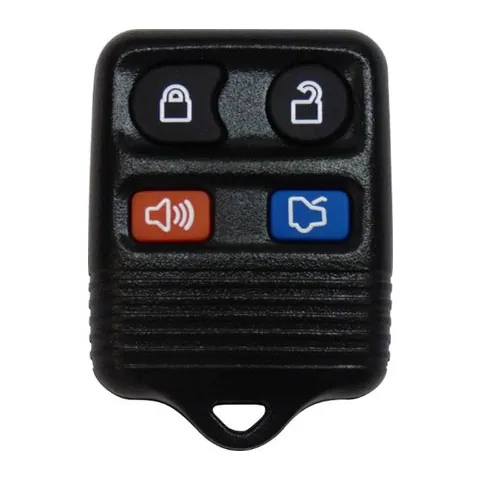
3/4-button Remote
Find on Amazon- FCC ID
- CWTWB1U322, CWTWB1U331, CWTWB1U345, CWTWBIU322, CWTWBIU331, CWTWBIU345, GQ43VT11T, OUC6000022, OUCD6000022
- OE part #
- 15K60153309140, 15K601535093529138, 2L3T-15K601-AA, 2L3T-15K601-AB, 2L3Z-15K601-AB, 2S4T-15K601-AA +13 more
- Frequency
- 315 MHz
- Chip
- 4D63 80-BIT
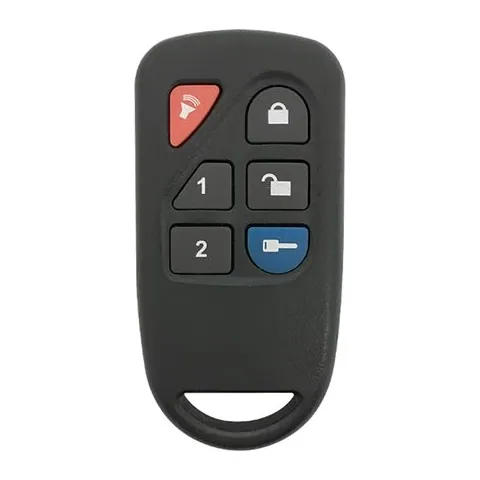
6-button Remote
Find on Amazon- FCC ID
- GOH-PCGEN2
- OE part #
- 8L3D-15K601-AA
- Frequency
- 433 MHz
Photos show the OEM part for each number listed. Aftermarket replacements sold online are often slightly different in appearance — the FCC ID, not the shape, is what determines whether a fob will work with your car.
2004–2008 Ford E-350 Super Duty
Remote / key fob programming
Programming a remote on this Ford resets every remote for the vehicle, so you reprogram them all together. There are two common methods — try Method A first, and if it doesn't work use Method B. Do not press the brake pedal at any point.
Full steps: Ford Remote Programming: Reset and Relearn Every Remote
Key programming
You can add a new key to this Ford yourself if you already have two keys that start the engine. The new key must be cut first, and it has to be a genuine key — a cloned hardware-store key won't work.
Replacement key fob
Find your key type below, then match the FCC ID printed on the back of your existing fob — or, for a plain transponder key, the blank code — to be sure of the right part.
Remote
A separate key fob that only handles locking and unlocking.
3/4-button Remote
Find on Amazon- FCC ID
- CWTWB1U322, CWTWB1U331, CWTWB1U345, CWTWBIU322, CWTWBIU331, CWTWBIU345, GQ43VT11T, OUC6000022, OUCD6000022
- OE part #
- 15K60153309140, 15K601535093529138, 2L3T-15K601-AA, 2L3T-15K601-AB, 2L3Z-15K601-AB, 2S4T-15K601-AA +13 more
- Frequency
- 315 MHz
- Chip
- 4D63 80-BIT
Photos show the OEM part for each number listed. Aftermarket replacements sold online are often slightly different in appearance — the FCC ID, not the shape, is what determines whether a fob will work with your car.
Ford E-350 Super Duty key fob battery
Your Ford E-350 Super Duty key fob uses a CR2032 3V lithium coin cell. A fresh one typically lasts 3–5 years.
Buy Energizer CR2032 Lithium Coin Batteries (4-pack) on AmazonHow to replace the battery
- 1 Find the seam or small slot on the edge of the remote.
- 2 Twist a coin or small flathead in the slot to split the case open.
- 3 Remove the old coin cell and note the + side.
- 4 Fit the new battery with the + side matching, then close the case.
- 5 Press a button to confirm the LED lights, then test at the car.
Battery tips
- Use a fresh, name-brand 3V lithium cell — bargain cells drain quickly.
- Try not to touch both faces of the new battery; skin oils shorten its life.
- If the remote still doesn't work after a new battery, it may need re-syncing or programming.
We may earn a commission on qualifying purchases made through links on this page, at no extra cost to you. It never affects which product we recommend. Learn more.
Rather hire a pro?
See what it actually costs, broken out by dealer, locksmith, and DIY: