How-to Updated 2026
How to Change a Key Fob Battery
Swapping a key fob battery takes about two minutes, and the only part people get wrong is the battery itself. In our own database, 3,388 vehicle-years record a battery type, and 878 of them — 25.9%, about one in four — list no CR2032 anywhere, and the assumption misses most often on the makes people search for: Honda, Toyota, Nissan, Mazda, Lexus and Subaru all record a different cell more often than CR2032. Confirm your size first, then use the steps below for your style of fob.
First, confirm the size
Three ways to check, in order of reliability: read the code printed on the old cell once the fob is open, check your owner's manual, or look up your exact vehicle and year in our key fob database, which records the battery type alongside the FCC ID. If you would rather not buy twice, open the fob first and read the old cell — that answer is always right for your car.
Every coin cell we have on record
3,388 of the 3,461 vehicle-years in our fob database (97.9%) carry at least one recorded battery type. Seven different coin cells show up across them:
- CR2032 — 2,510 vehicle-years (74.1%)
- CR2025 — 688 vehicle-years (20.3%)
- CR2016 — 385 vehicle-years (11.4%)
- CR1620 — 243 vehicle-years (7.2%)
- CR1616 — 193 vehicle-years (5.7%)
- CR2450 — 91 vehicle-years (2.7%)
- CR1632 — 57 vehicle-years (1.7%)
Those percentages deliberately do not add up to 100. A single vehicle-year often lists more than one fob — a remote head key and a separate button remote, or several button-count variants — and each can take its own cell. Read every line as "at least one fob on record for this vehicle-year uses this battery," not as a share of all cars. The number worth remembering is the other one: 878 vehicle-years, 25.9%, record no CR2032 at all.
It changes by year, not just by make
This is the part most guides skip. Within a single nameplate the battery changes as the fob design changes, so "the Honda battery" is not a thing — the Civic alone runs through four different cells across the years we have on file:
- Honda Civic — CR2025 on 2001–2005, CR1616 on 2006–2013, then CR2032 and CR1620 on 2014–2017. On 2008–2012 both CR1616 and CR2032 fobs are on record, so check the cell in your own fob rather than the year alone.
- Honda Accord — CR2025 on 1998–2002, CR1616 on 2003–2012, then CR2032 and CR1620 on 2013–2017.
- Toyota Camry — CR2016 and CR2025 on 1998–2005, CR2025 and CR1632 on 2006–2011, CR2032 and CR2016 on 2012–2017, then CR1620 and CR2032 on 2018–2021.
- Toyota Corolla — CR2016 and CR2025 through 2008, CR2025 and CR1632 on 2009–2013, then CR2032 and CR2016 on 2014–2016.
- Nissan Altima — CR2032 on 2000–2001, CR2025 on 2002–2006, then CR2032 again from 2007 through 2020. Watch the overlaps: 2005, 2006 and 2009 also have CR1620 fobs on record, so those three years can go either way.
- Honda CR-V — CR2025 on 2002–2004, CR1616 on 2005–2013, then CR2032 and CR1620 on 2014–2016.
- Subaru Outback — CR2025 on 2005–2007, then CR1620 on 2008–2009.
- Volkswagen Jetta — CR2032 on every year we have on file, 1999 through 2011.
Several of those years list a second fob taking a different cell, which is why a model can appear under two batteries in the same year — a Camry from 2006 to 2011, for example, records both a CR2025 fob and a CR1632 one. That is another reason to read your own cell rather than trust a model-level answer.
The most common cell on each make
Counted by vehicle-year, these are the makes where CR2032 is not the default answer:
- Honda — most often CR1616 (84 vehicle-years), then CR2025 (63) and CR2032 (61)
- Toyota — most often CR2016 (142), then CR2025 (127) and CR2032 (93)
- Nissan — most often CR2025 (171), then CR1620 (131) and CR2032 (99)
- Mazda — most often CR2025 (64), then CR1616 (51) and CR2032 (26)
- Lexus — most often CR2025 (79), then CR2016 (30)
- Acura — most often CR2025 (32), then CR1620 (16) and CR1616 (15)
- Subaru — most often CR2025 (23), then CR1620 (12)
- BMW — most often CR2025 (14), then CR2032 (10)
On plenty of other makes the common assumption happens to be right. Chevrolet (443 vehicle-years), Ford (398), GMC (207), Dodge (157), Audi (106), Buick (99), Cadillac (97), Volkswagen (87), Jeep (74), Chrysler (51), Ram (40) and Kia (21) are all led by CR2032 in our data. Exceptions still exist inside every one of them — Ford also records CR2016 on 57 vehicle-years and CR2450 on 15 — so it is still worth a look before you buy.
And by fob type
The three powered fob styles in our data lean toward CR2032 by different margins:
- Button remote, no blade (2,476 on record) — CR2032 56.3%, CR2025 23.7%, CR2016 16.6%, CR2450 2.7%
- Remote head key, blade and buttons in one piece (2,022 on record) — CR2032 60.7%, CR1620 13.0%, CR1616 10.6%, CR2025 10.1%
- Proximity / smart key (1,270 on record) — CR2032 69.4%, CR2025 21.3%, CR1632 6.1%, CR2450 3.1%
How to open a button remote
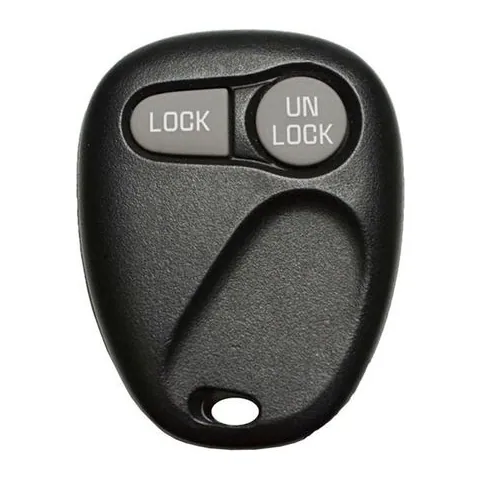
- Find the seam, or a small slot cut into the edge of the case.
- Twist a coin or a small flathead in the slot until the case splits. A plastic pry tool is kinder to the plastic and to the contacts.
- Lift out the old cell and note which side faces up before it goes anywhere.
- Fit the new cell the same way up.
- Close the case, press a button, and check the LED if it has one — then test it at the car.
How to open a remote head key
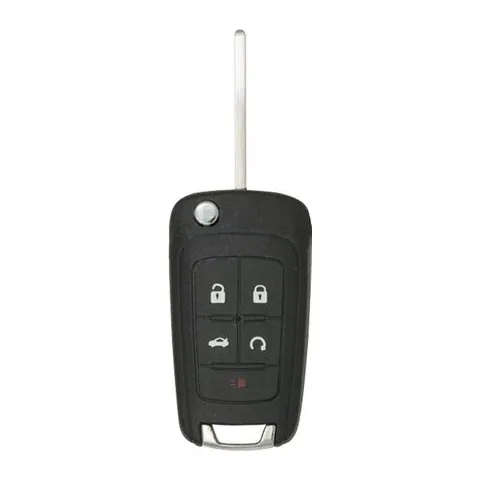
- Look for a small notch, or a screw, on the side where the blade meets the buttons.
- Remove the screw if there is one, then pry the case apart at the notch with a coin or small flathead.
- Pop out the old cell, noting which side faces up.
- Insert the new cell the same way up.
- Snap the case shut and test the buttons.
How to open a proximity or smart key
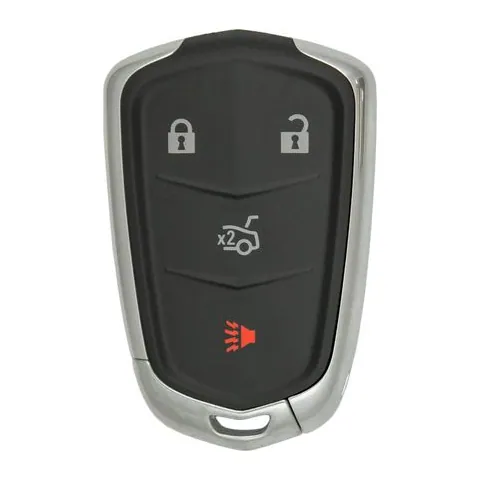
- Slide the release latch and pull the metal emergency key out of the fob.
- Use that key, or a coin, to pry the two halves apart at the seam.
- Lift out the old cell and note which side faces up — the printed + side usually faces the back cover.
- Drop the new cell in the same way, then press the halves together until they click.
- Test the lock and unlock buttons, and push-to-start, before you rely on it.
A few things that make it go smoothly
Use a fresh, name-brand 3V lithium cell — one that has been rattling around a drawer is often nearly as flat as the one you are replacing. Try not to touch both faces of the new cell with bare fingers, since the oil from your skin shortens its life. Most fobs run about three to five years on a battery. And if a fresh cell does not bring the fob back, the problem is usually not the battery: the fob may need re-syncing or reprogramming to the car.
Keep coin cells away from children
A swallowed lithium coin cell is a medical emergency, not a wait-and-see. If you think a child has swallowed one, go straight to an emergency room or call Poison Control rather than waiting for symptoms. Do not leave the old cell loose on a counter or in a drawer — get rid of it as soon as the new one is in.
Transponder keys: no battery to change
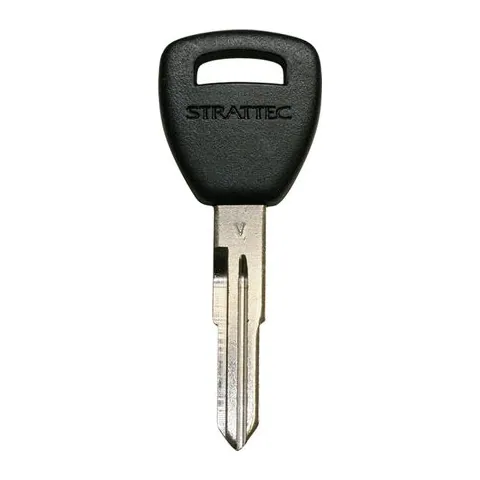
Not every car key has a battery in it. A plain metal key with no buttons — just a molded head and a cut blade — normally carries a passive transponder chip rather than a remote. The chip has no power source of its own: the car's immobilizer reads it at very short range and powers it from the car. If that is your key and it has stopped working, a battery is not the fix, and there is nothing inside to replace.
Step by step
- 1 Confirm your battery size. Read the code printed on the old cell, check your owner's manual, or look up your vehicle and year in our key fob database. The wrong size either will not seat or will not hold contact.
- 2 Get a fresh 3V lithium coin cell. CR2032 is the most common size in our data, but it is the wrong answer for about one vehicle-year in four — confirm yours before buying.
- 3 Find the seam or the release. On a button remote, look for a seam or a small slot on the edge. On a remote head key, look for a notch or screw where the blade meets the buttons. On a proximity or smart key, slide the release latch and pull the metal emergency key out first.
- 4 Open the case. Twist a coin, the emergency key, or a small flathead in the seam until the case splits. A plastic pry tool avoids gouging the case or slipping across the contacts.
- 5 Take out the old cell. Note which side faces up — usually the printed + side — before you lift it out.
- 6 Fit the new cell the same way up. Handle it by the edge where you can; skin oil on both faces shortens its life.
- 7 Close it up and test it. Press the halves together until they click, press a button and check the LED if it has one, then test it at the car before you rely on it.
What we recommend
Lithium coin cell battery for key fobs
Confirm your own size first — from the old cell, your owner's manual, or your vehicle's page in our key fob database — because the wrong size either will not seat or will not hold contact. Multipacks are inexpensive, and a spare in the drawer saves a second trip in three years' time.
Pros
- Cheap enough to keep a spare, and widely stocked at pharmacies and hardware stores as well
- The same cell sizes cover most household remotes, not just car keys
Cons
- The wrong size will not fix the problem — check before you buy
- An unbranded cell may hold less charge than a name-brand one of the same size
Plastic pry tool set
Some fobs give you no slot for a coin, just a tight seam. A metal screwdriver gouges the case and can slip across the battery contacts; a plastic pry tool spreads the seam without marking it. A coin or the fob's own metal emergency key works on plenty of fobs — just not all of them.
Pros
- Will not scratch or crack the housing the way a screwdriver can
- One small set covers most consumer electronics, not only key fobs
Cons
- Unnecessary for a fob that already has an obvious pry slot
- A really stiff seam is often still easier with the fob's own emergency key
We may earn a commission on qualifying purchases made through links on this page, at no extra cost to you. It never affects which product we recommend. Learn more.
Frequently asked questions
- What size battery does my key fob take?
- Most take a CR2032, but check rather than assume — 25.9% of the vehicle-years in our database record no CR2032 at all. The size is printed on the old cell once the fob is open, and it is listed for your specific vehicle and year in our key fob database. Look up your vehicle's fob, battery type and FCC ID
- What battery does a Honda key fob take?
- Not usually a CR2032, which is the common guess. Across Honda vehicle-years our database records CR1616 most often, then CR2025, with CR2032 third. On the Civic it runs CR2025 for 2001–2005, CR1616 for 2006–2013 and CR2032 for 2014–2017, with 2008–2012 recording both CR1616 and CR2032 fobs; the Accord follows the same pattern a few years earlier. Check your own fob rather than the make.
- What battery does a Toyota key fob take?
- CR2016 is the most commonly recorded cell across Toyota vehicle-years, followed by CR2025, with CR2032 third. The Camry shows how much it moves: CR2016 and CR2025 on 1998–2005, CR2025 and CR1632 on 2006–2011, CR2032 and CR2016 on 2012–2017, and CR1620 and CR2032 on 2018–2021. Where two cells are listed for one year, the vehicle has two different fobs on record, so read the code on your own.
- What battery does a Nissan Altima key fob take?
- It depends on the year, and the Altima is a good example of why the make-level answer misleads. Our records show CR2032 on 2000–2001, CR2025 on 2002–2006, and CR2032 again from 2007 through 2020 — even though CR2025 is the most common cell across Nissan as a whole. Three years are not clean: 2005, 2006 and 2009 also have CR1620 fobs on record, so on those open the fob and read the cell before buying.
- Can I use a CR2025 instead of a CR2032?
- Not as a substitute. A fob designed around a CR2032 is built to that cell's thickness, so a thinner one can sit loose and lose contact — you may get intermittent operation, or a much shorter life, rather than a clean failure you would notice straight away. Use the size your fob specifies; the code is printed on the cell you took out.
- How often should a key fob battery be replaced?
- Most fobs run about three to five years on one cell. Shrinking range and a slower response to a button press are the usual early signs, and some vehicles put a low key-battery warning on the dash. There is no need to wait for it to die completely.
- I put a new battery in and the fob still does not work. Now what?
- First check the obvious: the cell the right way up, seated flat, and fresh rather than an old spare. If it is all correct, the fob may need re-syncing or reprogramming to the car, which is a separate job from the battery. If your key is a plain metal transponder key with no buttons, there was never a battery in it to begin with. What key fob programming costs
Related
Sources
- LocksmithRates key fob database — recorded battery types across 3,461 vehicle-years
- LocksmithRates — Honda Civic key fob and battery records by year
- LocksmithRates — Honda Accord key fob and battery records by year
- LocksmithRates — Honda CR-V key fob and battery records by year
- LocksmithRates — Toyota Camry key fob and battery records by year
- LocksmithRates — Toyota Corolla key fob and battery records by year
- LocksmithRates — Nissan Altima key fob and battery records by year
- LocksmithRates — Subaru Outback key fob and battery records by year
- LocksmithRates — Volkswagen Jetta key fob and battery records by year
Specs and prices are compiled from the sources above and current as of the update date. Availability and pricing change — confirm on the retailer page before buying.