How-to Updated 2026
Smart Key Battery Dead? How to Get In and Start Your Car
If your smart key fob's battery has died, you are not locked out and you don't need a locksmith. Nearly every keyless-entry fob hides a small mechanical key blade that opens the driver's door, and the same dead fob will still start the car — the chip your car reads to allow starting runs on the vehicle's own power, not the fob's coin-cell battery. In our own database of 1,682 proximity/smart key fobs, 89% record that separate passive chip, and the fix once you're moving again is usually a battery that costs a few dollars.
Get in: the mechanical key hiding in your fob
Look closely at the fob and you'll usually find a small release — a button, a sliding catch, or a tab — that lets a metal key blade slide free from the housing. Toyota notes that the mechanical key is built into every Smart Key, but the exact release motion (a button versus a sliding lock knob) depends on which Smart Key type your vehicle has, so check your owner's manual for the specific action on your car.
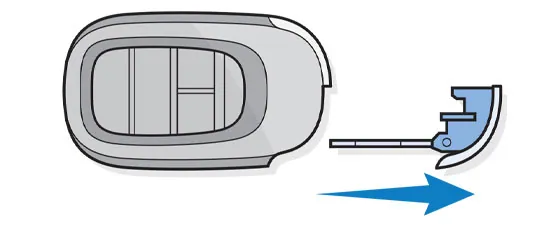
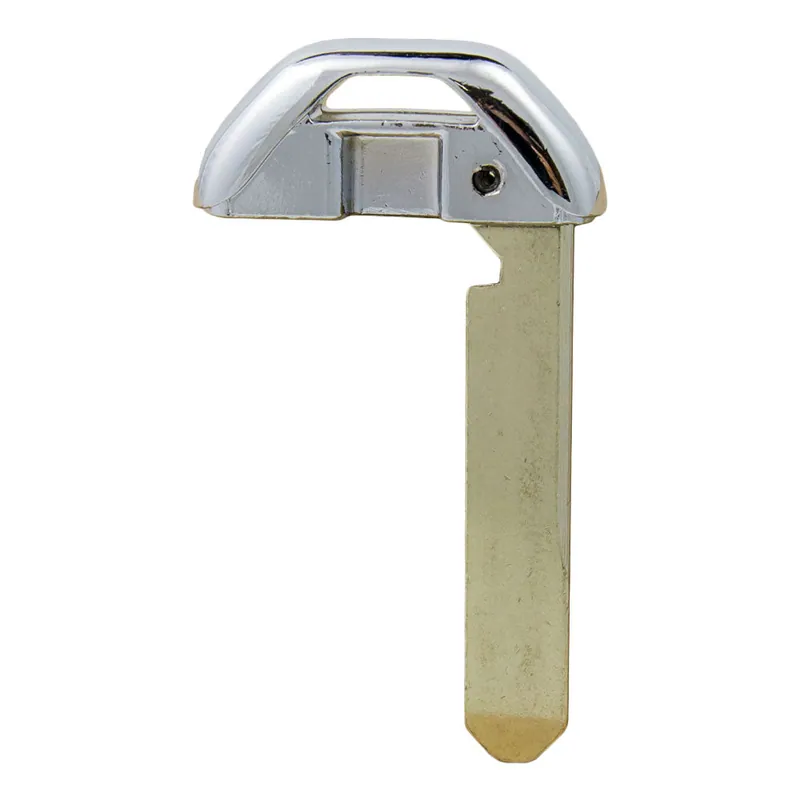
This isn't a rare or unusual feature. Emergency insert blades are standard equipment across nearly every keyless fob, common enough that locksmith parts suppliers stock them as their own product category, sold separately from the fobs they hide inside.
Find the hidden keyhole
On most vehicles, the driver's door handle has no visible keyhole at all — it's capped over, since you're expected to use the proximity sensor, not a key. Hyundai's owner's manual walks through exposing it on the Santa Fe: pull the door handle out, use the mechanical key to press the small hook inside the cover, then carefully pull the cover free. If the cover feels stuck, Hyundai specifically warns against forcing it — in cold weather, warm it first with your hands or breath, since a frozen cap can crack.
Honda fobs work on the same principle: the mechanical backup key hides inside the fob, and the door cylinder it fits sits behind a small removable cap on the driver's door handle.
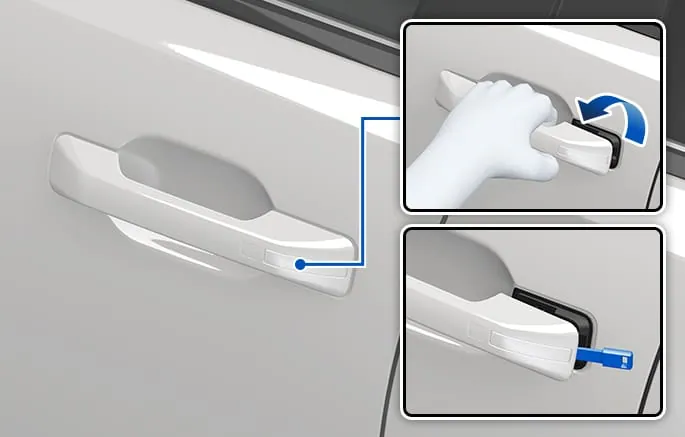
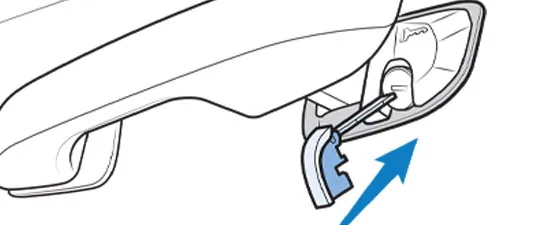
Some vehicles skip the cap entirely and leave a visible keyhole on the handle — if yours does, you can skip this step. Either way, your owner's manual shows the exact location and release motion for your specific car.
One thing to know before you unlock it
On some vehicles, unlocking the door with the metal key while the alarm is still armed can trigger the alarm — starting the engine with the fob nearby typically silences it. This behavior isn't documented consistently across manufacturers, so treat it as a heads-up rather than a guarantee, and check your owner's manual for how your car's system responds.
Start the car: the chip inside needs no battery
This is the part that surprises most people: a push-button car doesn't actually need power from the fob to start. Inside the smart key is a passive transponder chip — a small antenna and chip that the car's immobilizer reads at very close range, powered by the car itself, not the fob's battery. That chip is the part that keeps working when the coin cell doesn't: 89% of the 1,682 proximity keys in our database record one alongside the battery, which is why a car can still recognize a fob whose battery is completely dead.
Automakers document two backup patterns for getting that chip close enough to be read.
- Hold it against the button. Toyota tells owners to hold the Smart Key directly against the START button and press it once inside the car. Kia's documented fix is nearly identical: press the brake, then press the Engine Start/Stop button with the smart key held directly against it. Mazda's owner's manual describes the same idea under 'Engine Start Function When Key Battery is Dead' — brake down, fob held against the Start/Stop button.
- Set it in a marked slot. Ford builds a backup slot into the console storage compartment, cup holder, or another location depending on the year and model — place the fob in it with the buttons facing the rear, press the brake pedal, then press the push-button ignition switch. Hyundai's Santa Fe uses the same idea: a marked spot in the center console tray, with the same brake-then-start sequence.
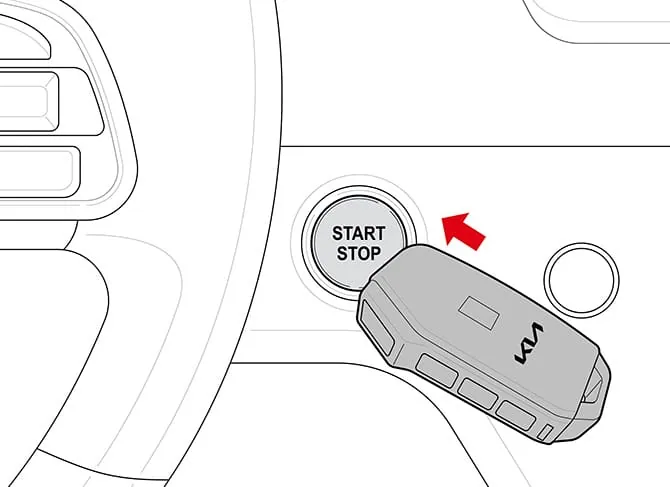
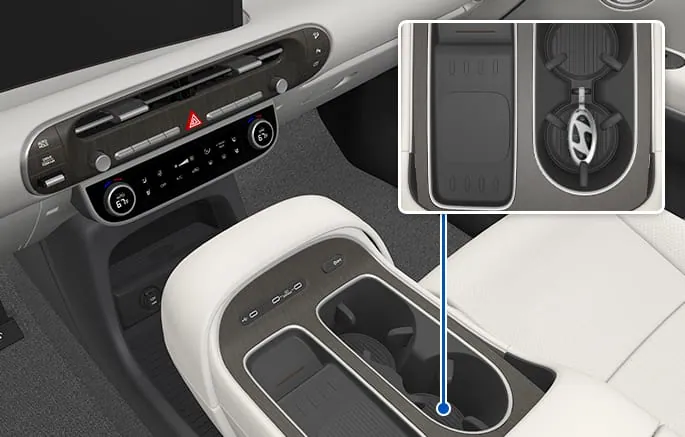
Which pattern your car uses is always spelled out in the owner's manual, usually under a heading like 'if the smart key battery is depleted.' Look there before assuming your car doesn't have a backup — nearly every push-button-start vehicle does.
If it still won't start
If holding the fob to the button (or setting it in the backup slot) doesn't work, and your power door locks were also unresponsive when you first tried to get in, Toyota's own troubleshooting points at a different culprit: a weak 12-volt car battery, not the fob. The Smart Key's coin cell only needs enough charge to send a short-range signal a few inches — it isn't what cranks the engine. If the whole car feels dead, that's a car-battery or jump-start problem, not a fob problem.
Afterward: replace the battery
Once you're moving again, the actual fix is inexpensive. Across the 1,682 proximity/smart keys in our database, 99.5% run on a lithium coin cell, and the sizes cluster tightly: CR2032 in 69% of fobs, CR2450 in 22%, CR2025 in 6%, and CR1632 in about 2.5%. Coin cells like these cost only a few dollars at a pharmacy, hardware store, or battery retailer. Our key fob programming pages list the exact fob, battery type, and FCC ID for thousands of specific vehicles — search yours to confirm before you buy.
The exception: Tesla
Tesla doesn't build a mechanical backup into its key fobs or cards at all — there's no hidden blade and no keyhole to find. Tesla's own support documentation describes unlocking with a phone key, key card, or fob, and for a dead or lost key you tap the key card against the reader at the B-pillar or console instead. If you drive a Tesla, none of the blade or keyhole steps above apply — check Tesla's own instructions for your model.
Step by step
- 1 Find the release on your fob. Look for a button, sliding catch, or tab on the fob housing — this is what lets the mechanical key blade slide free. The exact motion varies by manufacturer, so check your owner's manual if it isn't obvious.
- 2 Slide out the emergency key blade. Release the catch and pull the small metal blade free from the fob housing. It's cut for your door lock only, not the ignition.
- 3 Uncover the door keyhole. If your driver's door handle has no visible keyhole, look for a small removable cap. Use the blade (or your fingers, per your manual) to press the release hook inside the cover, then pull the cover free gently — warm it first if it's cold and stuck.
- 4 Unlock the door with the blade. Insert the mechanical key into the now-exposed cylinder and turn to unlock the door.
- 5 Hold the dead fob against the start button. Once inside, press the brake pedal and hold the fob directly against the push-button start switch, then press the button. This is the documented backup on most makes.
- 6 Check for a backup slot if that doesn't work. Some vehicles use a marked backup slot in the console, cup holder, or storage compartment instead of the button itself. Check your owner's manual for its location and the buttons-facing orientation it may require.
- 7 Replace the coin-cell battery. Once the car is running, replace the fob's battery. Most take a CR2032, CR2450, CR2025, or CR1632 lithium coin cell — a few dollars at any pharmacy or hardware store.
What we recommend
Replacement smart key fob
If your fob needs more than a battery — a cracked shell, buttons that no longer register, or it's simply worn out — a replacement fob is far cheaper than a dealer key. Match the FCC ID printed inside the battery compartment before buying; our key fob programming pages list the FCC ID and battery type for your exact vehicle.
Pros
- Usually a fraction of dealer pricing for the same part
- Widely available across most makes and model years
Cons
- A new fob still needs to be programmed to your car before it will start it — factor that into the total cost
- Match the FCC ID exactly; a look-alike fob for the wrong trim or region won't pair
We may earn a commission on qualifying purchases made through links on this page, at no extra cost to you. It never affects which product we recommend. Learn more.
Frequently asked questions
- Can I still start a push-button car if the fob battery is completely dead?
- Yes. The chip your car reads to allow starting is passive and doesn't need its own power — it's the coin-cell battery that fails, not the chip. Hold the fob against the start button (or set it in your car's marked backup slot) with the brake down, and it should start.
- Where is the hidden keyhole on my car?
- Usually behind a small cap on the driver's door handle — pull the handle, press the release hook with your mechanical key per your owner's manual, and the cap comes free. Some vehicles leave the keyhole visible with no cap at all.
- Will unlocking the door with the metal key set off the alarm?
- It can, on some vehicles, if the alarm is still armed — starting the engine with the fob nearby typically quiets it. This isn't consistent across manufacturers, so check your owner's manual for how your car's system behaves.
- What battery does my key fob take?
- Most smart keys use a CR2032 (about 69% of the fobs in our database), CR2450 (22%), CR2025 (6%), or CR1632 (about 2.5%) lithium coin cell. Search your vehicle on our key fob programming pages to confirm the exact battery and FCC ID. How to change a key fob battery
- When should I replace the fob battery?
- Don't wait for a dead fob. Many vehicles display a key-battery warning on the dash when the coin cell runs low — your owner's manual will say whether yours does — and shrinking remote range is the other classic early sign. A replacement cell costs a few dollars, so swap it at the first symptom.
- Does every car have a mechanical backup key?
- Nearly every gas and hybrid vehicle with a smart fob does. Tesla is the notable exception — its key cards and fobs have no mechanical blade or keyhole at all; you tap a key card at the B-pillar instead.
Related
Sources
- Toyota Support — If the battery in the Smart Key fob is depleted
- Toyota Support — How do I remove the mechanical key from the Smart Key?
- Hyundai Owner's Manual — Using the Mechanical Key (Santa Fe)
- Hyundai Owner's Manual — Starting with a dead smart key (Santa Fe)
- Kia Quick Tips — Starting your car when the smart key battery is dead
- Ford Support — How do I find the Intelligent Access key backup slot?
- Mazda Owner's Manual — Engine Start Function When Key Battery is Dead (Mazda3)
- Honda Info Center — Key Fob and Keyhole (Civic)
- Tesla Support — Vehicle keys
- Batteries Plus — key fob batteries (CR2032)
- LocksmithRates key fob database — battery and transponder-chip records across 1,682 proximity keys
Specs and prices are compiled from the sources above and current as of the update date. Availability and pricing change — confirm on the retailer page before buying.